The Complete Guide to ChatGPT Caricatures: How to Join the 2026 Viral Trend
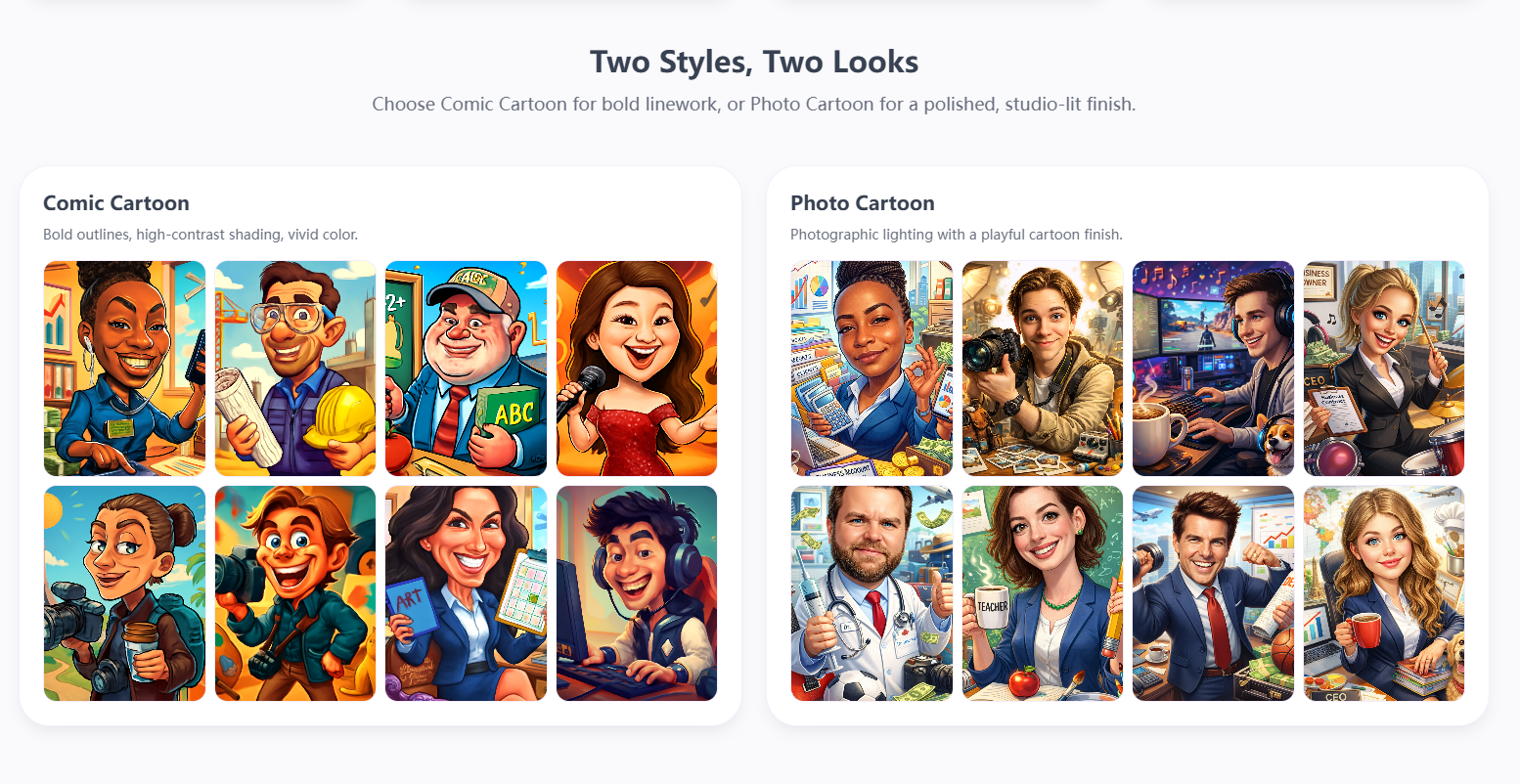
Photo Cartoon vs Comic Cartoon: Compare the two artistic styles available for your AI caricature
The first major AI trend of 2026 is here, and it's sweeping across TikTok, Instagram, LinkedIn, and beyond. ChatGPT caricatures—personalized AI-generated cartoon portraits—are everywhere, transforming how people present themselves online.
What started as a fun experiment has rapidly evolved into a global phenomenon. Users everywhere are discovering the joy of seeing themselves reimagined as vibrant, expressive caricatures that capture their professional identity and personality.
In this comprehensive guide, we'll walk you through everything you need to know about the ChatGPT caricature trend—from understanding what makes it so viral to creating your own stunning caricature in minutes.
What is the ChatGPT Caricature Trend?
The ChatGPT caricature trend is a viral movement where users transform their photos into personalized, AI-generated cartoon portraits that reflect their profession, hobbies, and personality. Unlike simple cartoon filters, these caricatures maintain facial recognizability while exaggerating key features in a fun, artistic way.
Major media outlets including USA Today, Forbes, and Fast Company have all covered this phenomenon, calling it "the first AI trend of 2026" that's reshaping digital identity across social platforms.
What makes this trend so compelling is the personal connection. Each caricature tells a story—showing not just what someone looks like, but who they are and what they do. That's why these images are naturally driving engagement, shares, and conversations across every major platform.
Photo Cartoon vs Comic Cartoon: Which Style Fits You?
Before creating your caricature, it's important to understand the two main artistic styles available. Each serves different purposes and creates distinct visual effects.
Photo Cartoon
Photographic lighting with soft textures and a clean, studio-grade finish
- Professional appearance ideal for LinkedIn
- Subtle, refined caricature effects
- Best for personal branding
- Credits: 6-8 per image
Comic Cartoon
Bold outlines, high-contrast shading, and vivid comic-style colors
- Perfect for social media fun
- Expressive, eye-catching style
- Great for entertainment
- Credits: 2-12 per image
Size Guide: Which Format Should You Choose?
Different platforms and use cases require different image formats. Here's a quick guide to help you choose the right size for your caricature:
| Size | Ratio | Best For | Credits |
|---|---|---|---|
| Square | 1:1 (1024×1024) | Instagram avatars, profile pictures, most social platforms | 2 |
| Portrait | 2:3 (1024×1536) | Instagram Stories, phone wallpapers, TikTok covers | 3 |
| Landscape | 3:2 (1536×1024) | YouTube banners, Twitter headers, blog featured images | 3 |
How to Create Your ChatGPT Caricature: Step-by-Step
Step 1: Upload Your Photo
Start with a clear, well-lit photo. A frontal shot with a simple background works best. You can drag and drop your image or click to browse—JPG and PNG formats are supported.
✅ Recommended: Good lighting, clear face, simple background
❌ Avoid: Blurry images, poor lighting, face obstructions
Step 2: Choose Your Profession (Required)
Your profession defines the core elements of your caricature. Select from 8 preset options or choose "Other" to enter a custom profession. The AI will incorporate professional clothing, props, and themed environments.
Presets: Developer, Doctor, Designer, Business Owner, Teacher, Chef, Photographer, Gamer
Step 3: Add Hobbies (Optional)
Enhance your caricature with personality by adding hobbies. Choose from 8 preset options or enter custom hobbies. You can select multiple hobbies—the AI will blend them creatively into your portrait.
Presets: Fitness, Travel, Music, Coffee, Gaming, Art, Sports, Other
Step 4: Add Creative Details (Optional)
Want something extra specific? Use the creative input field (up to 200 characters) to describe specific elements, scenes, or moods. Examples: "Cyberpunk city at night," "holding a glowing orb," or "rainy neon atmosphere."
Step 5: Choose Style and Size
Select your artistic style (Photo Cartoon or Comic Cartoon) and image size (Square, Portrait, or Landscape). The credit cost will display based on your selections.
Step 6: Generate and Download
Click "Generate Caricature" and watch the magic happen. Generation typically takes 10-20 seconds. Once complete, your caricature appears instantly and can be downloaded with a single click.
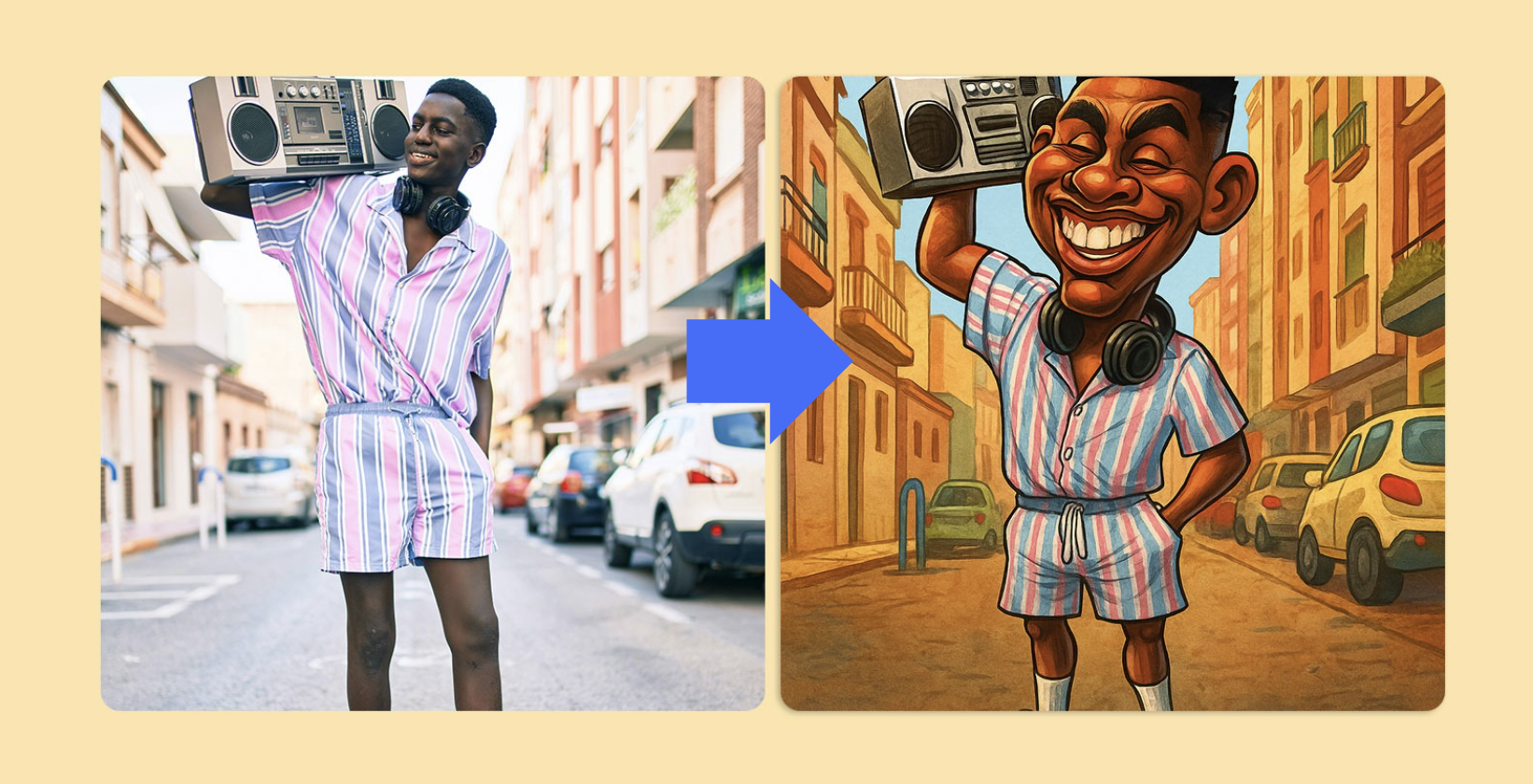
Before and after: The transformation from photo to caricature
Understanding the Credit System
Creating caricatures uses a credit-based system. Here's what you need to know:
New User Bonus
2 free credits when you sign up (valid for 7 days)—enough to create one Comic Cartoon in Square format!
| Style | Size | Quality | Credits |
|---|---|---|---|
| Comic Cartoon | Square | Standard | 2 |
| Comic Cartoon | Portrait/Landscape | Standard | 3 |
| Comic Cartoon | Square | Standard | 2 |
| Comic Cartoon | Portrait/Landscape | Standard | 3 |
| Photo Cartoon | Square | Standard | 2 |
| Photo Cartoon | Portrait/Landscape | Standard | 3 |
Credit packages and subscriptions available. Failed generations are fully refunded.
Profession-Based Caricature Ideas
Each profession brings unique visual elements to your caricature. Here's how different careers translate into cartoon art:
Developer
Code elements, tech accessories, geek-chic style
Doctor
Medical props, white coat, stethoscope
Designer
Creative tools, artistic flair, design elements
Business Owner
Professional attire, leadership props, office setting
Teacher
Educational props, blackboard, books
Chef
Chef coat, cooking tools, food elements
Photographer
Camera gear, lenses, studio equipment
Gamer
Gaming controllers, RGB lighting, esports style
Custom Professions: Select "Other" to create caricatures for any career—Astronaut, Artist, Musician, or anything else you can imagine.
Pro Tips: How to Get the Best Results
📸 Photo Quality Matters
Use high-quality, well-lit photos. The AI works best with clear facial features and good contrast. Avoid grainy, dark, or heavily filtered images.
🎯 Combine Profession + Hobbies
Mix and match for unique results: Developer + Gaming = tech-gaming fusion, Designer + Travel = traveling creative, Chef + Fitness = health-conscious cook.
✍️ Write Specific Creative Descriptions
Instead of generic terms, use specific visual details: "Cyberpunk city at night with neon rain" instead of "cool background."
🔄 Experiment and Iterate
Try different styles, sizes, and creative inputs. Each variation produces unique results—find what best represents your personality.
Why Choose Our Platform?
While ChatGPT offers general image generation, our platform is specifically designed for creating professional caricatures with unmatched customization:
| Feature | Generic ChatGPT | AI Caricature Generator |
|---|---|---|
| Profession Templates | ❌ Requires description | ✅ 8 presets + custom |
| Hobby Selection | ❌ Requires description | ✅ 8 presets + custom |
| Style Options | Limited | ✅ Photo + Comic |
| Size Selection | Fixed | ✅ 3 formats |
| Credit System | ❌ | ✅ Flexible pricing |
| New User Bonus | ❌ | ✅ 2 free credits |
| Direct Download | ❌ | ✅ One-click download |
Where to Use Your ChatGPT Caricature
Social Media
Instagram, TikTok, LinkedIn, Twitter/X, Facebook, Discord
Personal Branding
YouTube channels, websites, portfolios, business cards, email signatures
Creative Uses
Digital gifts, content marketing, presentations, podcast covers
Create Your Own ChatGPT Caricature Now
Join thousands of users who have already transformed their photos into stunning AI-generated caricatures. Upload your photo, choose your profession, select a style, and generate your unique caricature in just 10-20 seconds.
New users get 2 free credits (valid for 7 days). No credit card required.
Conclusion
The ChatGPT caricature trend shows no signs of slowing down in 2026. From TikTok creators to LinkedIn professionals, people everywhere are embracing AI-generated caricatures as a fun, expressive way to present their digital identity.
Whether you're looking to refresh your social media presence, create memorable content, or simply see yourself in a new artistic light, there's never been a better time to join the trend. With professional tools, flexible pricing, and instant results, creating your perfect caricature is just a few clicks away.
Ready to see yourself as a cartoon? Your AI caricature awaits.